
How to Bypass Mega Download Limits (2021 Method)
 Azaz Shaikh
Mega is based on cloud storage and mega has launched on January 20, 2013. The service has offered primarily through has web-based apps. However, Mega mobile apps are also available for Windows Phone, Android, and iOS. This mega has written in C++, JavaScript, Java, Objective-C. And this mega is available on Android and iOS. If you want to don’t use the storage of your mobile then download the mega files you save your all thing that you want to like pictures, video, a song many more. If you want to download mega then this article is for you to download mega. From this article, you will learn How to Bypass Mega Download Limits
How to Bypass Mega Download Limits
Here I will give you two links with the help of this to link you can download the mega file. The first one is Xtreme with the help of this software you can easily download mega. The second is mega downloader you need to download that after that don’t close then you need to copy the URL. You need to download both of them.
Step 1. When both software is installed then open the mega downloader then Select the Options, then click on the Configuration.
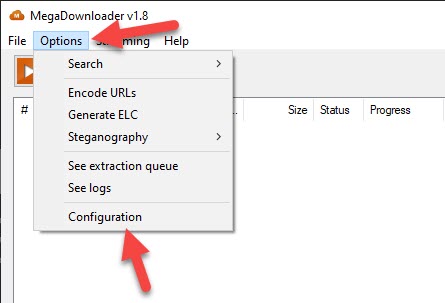 Select the Options Then Click on the Configuration
Step 2. Now, click on the Streaming from the menu options. Check the Use Streaming Server after that click on Save.
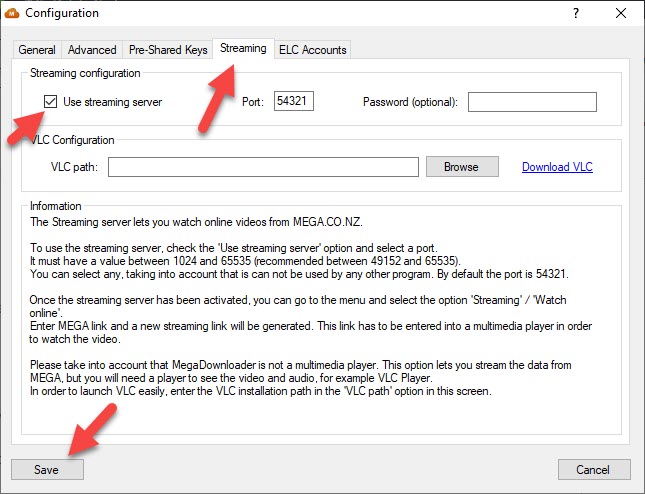 Check the Use Streaming Server After That Click on Save.
Step 3. Close the window then again select the Streaming, click on the Watch Online.
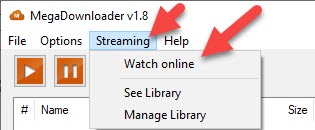 Select the Streaming Then Click on the Watch Online
Step 4. When you click on the watch online then go to mega downloader after that copy the URL.
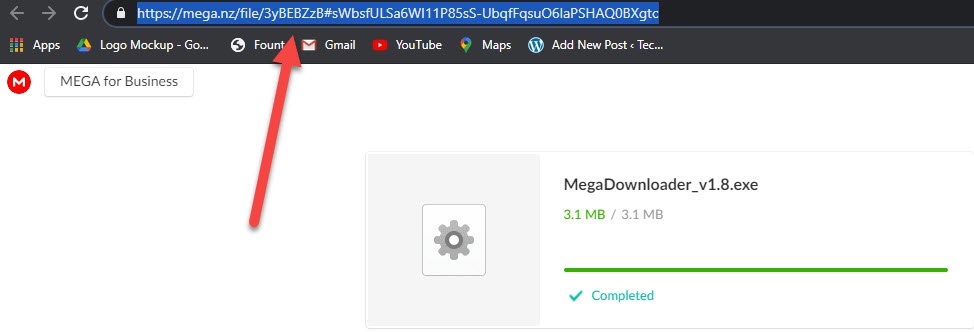 Copy the URL
Step 5. Go to the mega downloader software then paste the URL. When you paste the URL on the mega URL link then copy the Streaming Link URL.
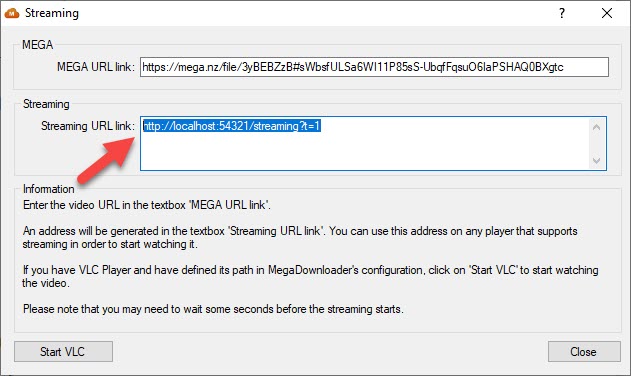 Copy the Streaming URL Link
Step 6. When you copy the link of streaming the open Xtreme after that select the File then click on the Add URL.
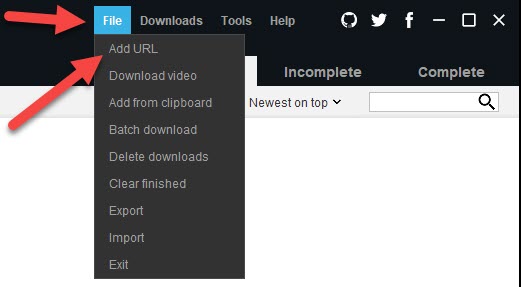 Select the File Then Click on the Add URL
Step 7. Paste the link here then click on the Download Now.
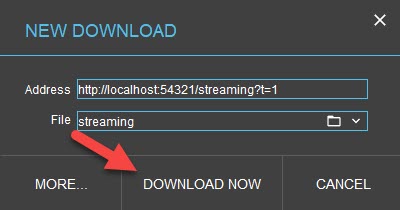 Click on the Download Now
When you click on the download now then wait for it downloading after that you will install it successfully.
Related Guide:
How to Download Facebook Videos Using Snaptube
How to Remove or Unlink Microsoft Account from Windows 10
Download a Windows 10 ISO Without the Media Creation Tool
Bottom Line
It was all about How to Download Mega File With on Limit. Easy ways to download mega files on android without facing any kind of problem. I hope after reading this article you will get something about mega files. So if you are faced with any kind of problem and if you have any suggestions then go down leave your comment.
Tagged
Share This Article
Mega is based on cloud storage and mega has launched on January 20, 2013. The service has offered primarily through has web-based apps. However, Mega mobile apps are also available for Windows Phone, Android, and iOS. This mega has written in C++, JavaScript, Java, Objective-C. And this mega is available on Android and iOS. If you want to don’t use the storage of your mobile then download the mega files you save your all thing that you want to like pictures, video, a song many more. If you want to download mega then this article is for you to download mega. From this article, you will learn How to Bypass Mega Download Limits
How to Bypass Mega Download Limits
Here I will give you two links with the help of this to link you can download the mega file. The first one is Xtreme with the help of this software you can easily download mega. The second is mega downloader you need to download that after that don’t close then you need to copy the URL. You need to download both of them.
Step 1. When both software is installed then open the mega downloader then Select the Options, then click on the Configuration.
Select the Options Then Click on the Configuration
Step 2. Now, click on the Streaming from the menu options. Check the Use Streaming Server after that click on Save.
Check the Use Streaming Server After That Click on Save.
Step 3. Close the window then again select the Streaming, click on the Watch Online.
Select the Streaming Then Click on the Watch Online
Step 4. When you click on the watch online then go to mega downloader after that copy the URL.
Copy the URL
Step 5. Go to the mega downloader software then paste the URL. When you paste the URL on the mega URL link then copy the Streaming Link URL.
Copy the Streaming URL Link
Step 6. When you copy the link of streaming the open Xtreme after that select the File then click on the Add URL.
Select the File Then Click on the Add URL
Step 7. Paste the link here then click on the Download Now.
Click on the Download Now
When you click on the download now then wait for it downloading after that you will install it successfully.
Related Guide:
How to Download Facebook Videos Using Snaptube
How to Remove or Unlink Microsoft Account from Windows 10
Download a Windows 10 ISO Without the Media Creation Tool
Bottom Line
It was all about How to Download Mega File With on Limit. Easy ways to download mega files on android without facing any kind of problem. I hope after reading this article you will get something about mega files. So if you are faced with any kind of problem and if you have any suggestions then go down leave your comment.