
How to Get Dark Mode on Whatsapp Web in macOS and Windows PC
 Azaz Shaikh
In this article, I am going to show you How to Get Dark Mode on Whatsapp Web in macOS and Windows PC. We are very lucky this year because dark mode rises on iOS 13. Instagram has dark mode and Gmail also has a dark mode, if you believe that almost 100+ apps that will support dark mode on iOS 13 which is very fun and enjoyable for the Dark mode lover. However, while our WhatsApp which is wonderful remained very backward in this race of dark mode. People are making the round that the feature is just around the corner for the mobile app. But what about WhatsApp web on the mac and windows pc. For people who work on their PC or Mac more than their smartphones, the web version of the app is pretty suitable. And having a dark theme and fun of using this feature.
Whatsapp web is very interesting on macOS or Windows PC because it has a wonderful dark mode which is very likable. That is why I am going to share a smart and very easy way to activate Dark Mode on WhatsApp Web on Mac and Windows PC. The methods or procedure of activating dark mode is workable because after lots of searching and practical I am going to guide you. Therefore, you have to follow each and everyone in order to understand the procedure very well.
 How to Get Dark Mode on Whatsapp in Mac and Windows PC
 Before You Turn on or off Whatsapp Dark Mode on Desktop
WhatsApp Web App. The code runs only for the app that has been downloaded from WhatsApp’s official website. The script will not work with the Mac App Store or Microsoft Store’s versions.
Download WADark. You have to download the theme for GitHub. It would be a zipped file, so extract its content in advance to keep the process smooth.
How to Get Dark Mode on Whatsapp Web in macOS and Windows PC
Step 1. First of all, you have to open the Whatsapp Web application for your macOS or Windows PC.
Step 2. After that, Scan the Code on screen in order to log in. If you are already logged in then you can simply skip the step.
Step 3. Now, open the stylish mode which is WAdark (macOS) and WAdark.exe (Windows PC).
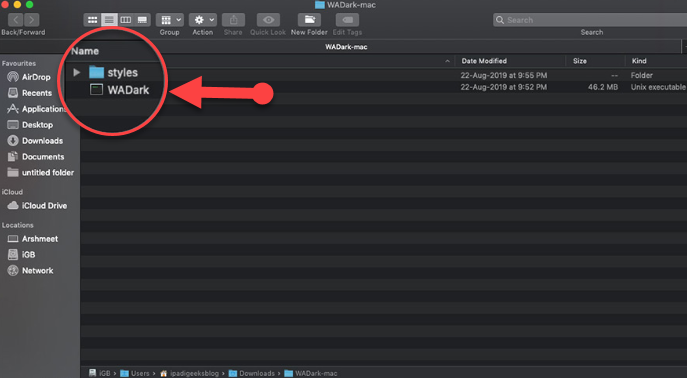 WADark
 Then your PC may stop the file from running as it an external file.
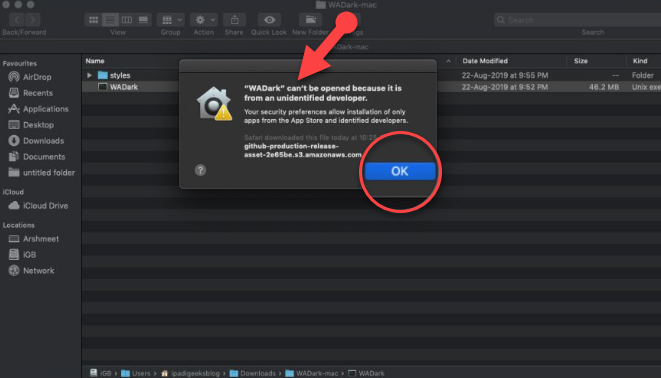 WADark can’t be opened
 Step 4. In order to give permissions or change your security settings so that it should work. You need to open System Preference.
Step 5. Then, open the Security and Privacy from the preference window.
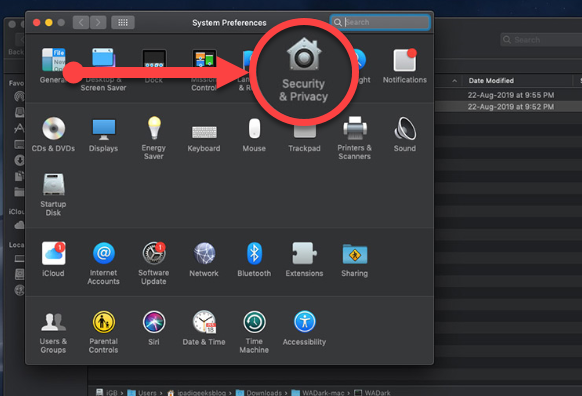 Security and Privacy
 Step 6. In this step, a new window will pop up, you have to click Open Anyway.
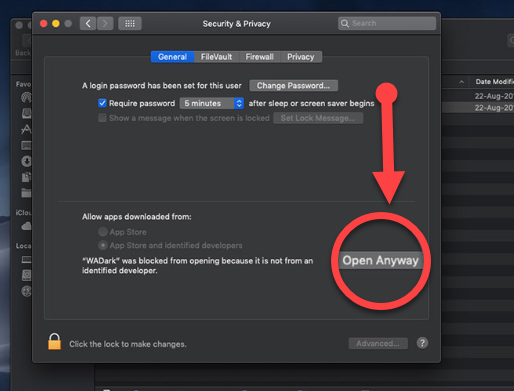 Open anyway
 Step 7. After that, again click on Open in order to give permission to activate the dark mode on Whatsapp Web.
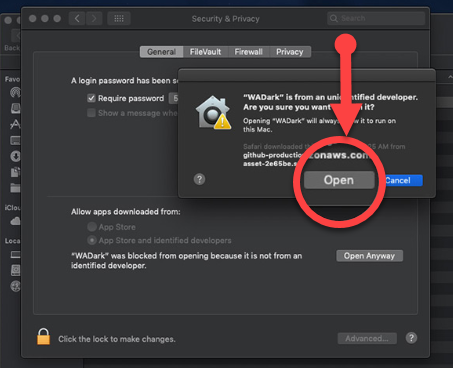 Open
Open Step 8. Now, a program will take some moment to activate the dark mode.
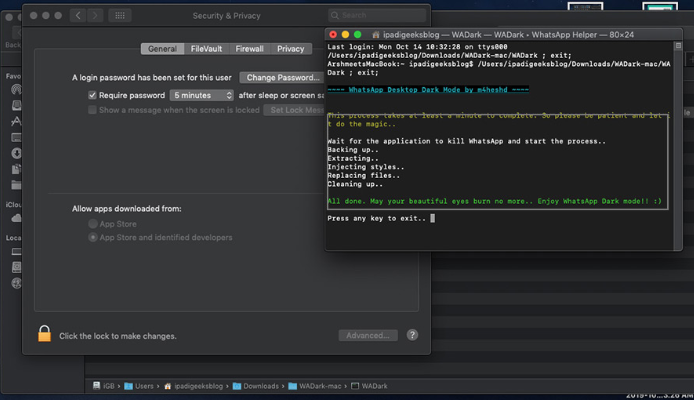 Activating Dark Mode
 Once you are done with all the steps, then you will have automatically a dark mode which will look a bit interesting.
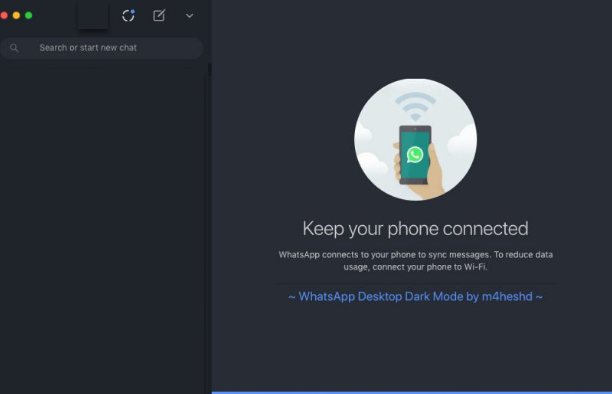 Whatsapp Web Dark Mode in macOS and Windows PC
 Related:
- How to Use iTunes Dark More on Mac or Windows 10 PC.
- How to Enable Google Chrome Dark Mode on Windows, Android, and iOS
Final Words
That’s all about How to Get Dark Mode on Whatsapp Web in macOS and Windows PC. After enabling Dark Mode on WhatsApp Web, I am missing the dark mode on smartphones. So, I hope that you will enjoy WhatsApp dark mode on macOS and Windows PC. So, if you faced any kind of problem or having any questions regarding this then feel free to comment. And don’t forget to give feedback and suggestion about this article.
Share This Article
In this article, I am going to show you How to Get Dark Mode on Whatsapp Web in macOS and Windows PC. We are very lucky this year because dark mode rises on iOS 13. Instagram has dark mode and Gmail also has a dark mode, if you believe that almost 100+ apps that will support dark mode on iOS 13 which is very fun and enjoyable for the Dark mode lover. However, while our WhatsApp which is wonderful remained very backward in this race of dark mode. People are making the round that the feature is just around the corner for the mobile app. But what about WhatsApp web on the mac and windows pc. For people who work on their PC or Mac more than their smartphones, the web version of the app is pretty suitable. And having a dark theme and fun of using this feature.
Whatsapp web is very interesting on macOS or Windows PC because it has a wonderful dark mode which is very likable. That is why I am going to share a smart and very easy way to activate Dark Mode on WhatsApp Web on Mac and Windows PC. The methods or procedure of activating dark mode is workable because after lots of searching and practical I am going to guide you. Therefore, you have to follow each and everyone in order to understand the procedure very well.
How to Get Dark Mode on Whatsapp in Mac and Windows PC Before You Turn on or off Whatsapp Dark Mode on Desktop
WhatsApp Web App. The code runs only for the app that has been downloaded from WhatsApp’s official website. The script will not work with the Mac App Store or Microsoft Store’s versions.
Download WADark. You have to download the theme for GitHub. It would be a zipped file, so extract its content in advance to keep the process smooth.
How to Get Dark Mode on Whatsapp Web in macOS and Windows PC
Step 1. First of all, you have to open the Whatsapp Web application for your macOS or Windows PC.
Step 2. After that, Scan the Code on screen in order to log in. If you are already logged in then you can simply skip the step.
Step 3. Now, open the stylish mode which is WAdark (macOS) and WAdark.exe (Windows PC).
WADark Then your PC may stop the file from running as it an external file.
WADark can’t be opened Step 4. In order to give permissions or change your security settings so that it should work. You need to open System Preference.
Step 5. Then, open the Security and Privacy from the preference window.
Security and Privacy Step 6. In this step, a new window will pop up, you have to click Open Anyway.
Open anyway Step 7. After that, again click on Open in order to give permission to activate the dark mode on Whatsapp Web.
Open Step 8. Now, a program will take some moment to activate the dark mode.
Activating Dark Mode Once you are done with all the steps, then you will have automatically a dark mode which will look a bit interesting.
Whatsapp Web Dark Mode in macOS and Windows PC Related:
- How to Use iTunes Dark More on Mac or Windows 10 PC.
- How to Enable Google Chrome Dark Mode on Windows, Android, and iOS
Final Words
That’s all about How to Get Dark Mode on Whatsapp Web in macOS and Windows PC. After enabling Dark Mode on WhatsApp Web, I am missing the dark mode on smartphones. So, I hope that you will enjoy WhatsApp dark mode on macOS and Windows PC. So, if you faced any kind of problem or having any questions regarding this then feel free to comment. And don’t forget to give feedback and suggestion about this article.