
How to Play Call Of Duty Mobile on PC With Mouse and Keyboard
 Azaz Shaikh
In this article, I am going to guide you How to Play Call Of Duty Mobile on PC With Mouse and Keyboard. We are lucky because we have one more outstanding game by the name of COD (Call Of Duty). Many people playing Call Of Duty on mobile but as my idea on mobile it is not interesting. Most of the gamers want to play Call Of Duty on PC with mouse and keyboard without any strong requirement. It turns out that you can play Call of Duty Mobile online with the help of a workaround that emulates the game on your PC so that you can COD Mobile with Mouse and Keyboard controls. It’s a strange mix of different maps, guns, and mechanics from various Call Of Duty games from the past. It also is developed by a company that is owned by Tencent.
Call of Duty Mobile finally released for all major operating systems worldwide recently. Out of the gate, the game has received nearly universal praise for its integration of the previous Call of Duty titles. Along with this, the content streams are fair and not secretive, unlike other large-scale multiplayer games, mobile or not.
Call Of Duty is recently released on October 1, 2019, which is seven days ago for the android and iOS devices. But we are trying to find out the way in order to play Call Of Duty on PC. It was originally announce in March of 2019. The closed beta was soon released in Australia and Canada. Call of DutyMobile is that it’s fully playable on PC with mouse and keyboard controls which is the most interesting same as PUBG. In fact, playing Call Of Duty on PC is incredibly simple. While this is how the game was intended to be played, some in the community want a little more freedom. As such, some websites are giving this freedom in the form of online emulators for PC. some people like to play CoD Mobile on their PC and I am here to tell you how to legally play it there.
 How to Play Call Of Duty Mobile on PC With Mouse and Keyboard
 How to Play Call Of Duty Mobile on PC With Mouse and Keyboard
I am going to guide you with the emulator that is the GameLoop emulator. This is surely the best method that’s also best implement with Call Of Duty Mobile its full name is Tencent Gameloop Emulator. This is also a free Android emulator that is extremely easy to use because it is lightweight and fast, you will be able to install it quickly and access the game instantly. Here is the method in order to Play Call Of Duty Mobile on PC With Mouse and Keyboard.
Step 1. First of all, in order to play a call of duty on mobile, you need to click on the link in order to download the GameLoop Emulator.
Step 2. When the downloading has finished, you need to double click on the downloaded emulator after that click on the Install. And wait for the installation process.
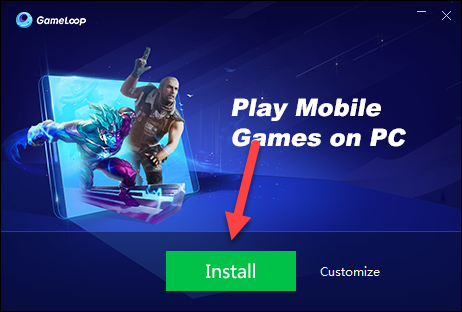 Install GameLoop
 Step 3. When the downloading process has finished then you need to click on the Start.
 Start the GameLoop
 Step 4. When the screen of GameLoop opens, after that you need to select the Games from the left side of GameLoop then you have to click Install in order to install the Call Of Duty on GameLoop.
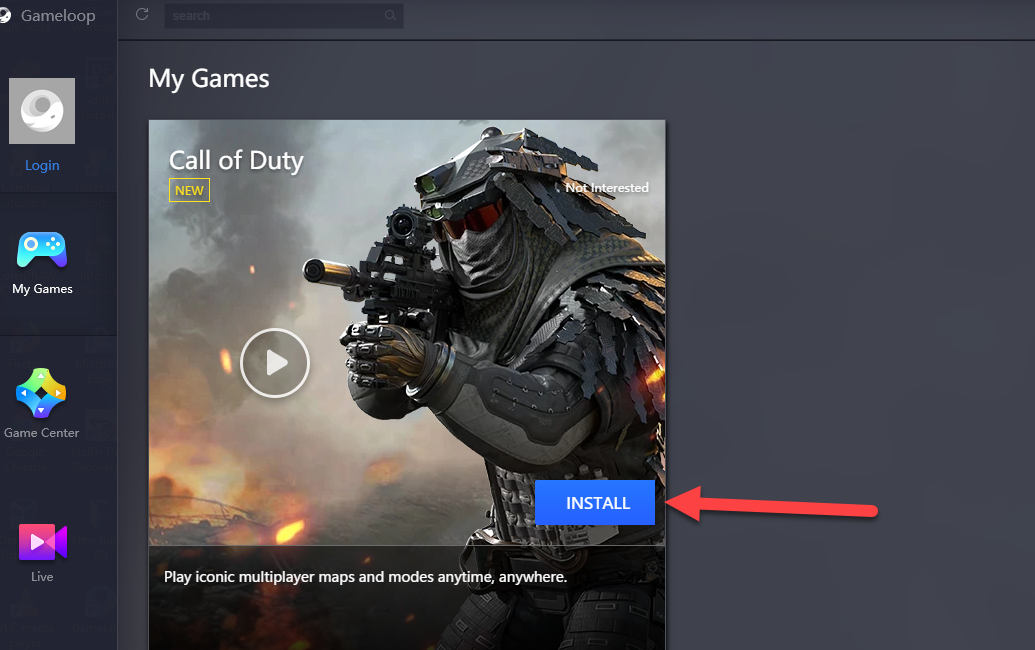 Install Call Of Duty on GameLoop
 When the installation of Call Of Duty has finished on the GameLoop. Then you will be able to play Call Of Duty with Mouse and Keyboard.
Related:
- How to play PUBG mobile on PC without bluestacks
- How to Play Garena Free Fire on PC with Mouse and Keyboard
Final Words:
That’s all about How to Play Call Of Duty Mobile on PC With Mouse and Keyboard. It is the complete process of playing call of duty on PC. So, hope you will enjoy playing Call Of Duty on PC with mouse and keyboard. If you face any sort of problem or any question then feel free to comment below. Don’t forget to comment on your feedback and suggestion.
Tagged
Share This Article
In this article, I am going to guide you How to Play Call Of Duty Mobile on PC With Mouse and Keyboard. We are lucky because we have one more outstanding game by the name of COD (Call Of Duty). Many people playing Call Of Duty on mobile but as my idea on mobile it is not interesting. Most of the gamers want to play Call Of Duty on PC with mouse and keyboard without any strong requirement. It turns out that you can play Call of Duty Mobile online with the help of a workaround that emulates the game on your PC so that you can COD Mobile with Mouse and Keyboard controls. It’s a strange mix of different maps, guns, and mechanics from various Call Of Duty games from the past. It also is developed by a company that is owned by Tencent.
Call of Duty Mobile finally released for all major operating systems worldwide recently. Out of the gate, the game has received nearly universal praise for its integration of the previous Call of Duty titles. Along with this, the content streams are fair and not secretive, unlike other large-scale multiplayer games, mobile or not.
Call Of Duty is recently released on October 1, 2019, which is seven days ago for the android and iOS devices. But we are trying to find out the way in order to play Call Of Duty on PC. It was originally announce in March of 2019. The closed beta was soon released in Australia and Canada. Call of DutyMobile is that it’s fully playable on PC with mouse and keyboard controls which is the most interesting same as PUBG. In fact, playing Call Of Duty on PC is incredibly simple. While this is how the game was intended to be played, some in the community want a little more freedom. As such, some websites are giving this freedom in the form of online emulators for PC. some people like to play CoD Mobile on their PC and I am here to tell you how to legally play it there.
How to Play Call Of Duty Mobile on PC With Mouse and Keyboard How to Play Call Of Duty Mobile on PC With Mouse and Keyboard
I am going to guide you with the emulator that is the GameLoop emulator. This is surely the best method that’s also best implement with Call Of Duty Mobile its full name is Tencent Gameloop Emulator. This is also a free Android emulator that is extremely easy to use because it is lightweight and fast, you will be able to install it quickly and access the game instantly. Here is the method in order to Play Call Of Duty Mobile on PC With Mouse and Keyboard.
Step 1. First of all, in order to play a call of duty on mobile, you need to click on the link in order to download the GameLoop Emulator.
Step 2. When the downloading has finished, you need to double click on the downloaded emulator after that click on the Install. And wait for the installation process.
Install GameLoop Step 3. When the downloading process has finished then you need to click on the Start.
Start the GameLoop Step 4. When the screen of GameLoop opens, after that you need to select the Games from the left side of GameLoop then you have to click Install in order to install the Call Of Duty on GameLoop.
Install Call Of Duty on GameLoop When the installation of Call Of Duty has finished on the GameLoop. Then you will be able to play Call Of Duty with Mouse and Keyboard.
Related:
- How to play PUBG mobile on PC without bluestacks
- How to Play Garena Free Fire on PC with Mouse and Keyboard
Final Words:
That’s all about How to Play Call Of Duty Mobile on PC With Mouse and Keyboard. It is the complete process of playing call of duty on PC. So, hope you will enjoy playing Call Of Duty on PC with mouse and keyboard. If you face any sort of problem or any question then feel free to comment below. Don’t forget to comment on your feedback and suggestion.