
How to Turn ON Restricted Mode in TikTok on iPhone and Android
 Azaz Shaikh
In this article, I am going to guide you on How to Turn ON Restricted Mode in TikTok on iPhone and Android. In today’s era, every individual person knows that TikTok became one of the best trending apps. People often use it just for entertainment. And people become the star of the world just by uploading 15 seconds of video on it. Moreover, nowadays even kids using TikTok for scrolling the video and making short clips just for fun. But now we have some problems with under 18 kids. As you know that as the number of users increased day by day, the quality and different types of content or video expand. So, unfortunately, many adult and violent clips are published by the passage of time. Therefore, turning on the restricted mode becomes more handy and easy work.
Noting is more important than taking care of kids from any angle of life. TikTok has some features for the kids, one of them is to enable the restricted mode, it means to avoid violent clips for the kids. In the case of safety for the kids and those who are not mature, the TikTok app introduced and designed Restricted Mode features for the users in order to limit and filter content that may not be suitable for minors and other audiences. Here is how you can easily enable Restricted Mode on the TikTok on iPhone and Android.
What is Restricted Mode?
Maximum Restricted Mode is available on every apps and device. It is one of the best and useful option, it will avoid the content that you may prefer not to see or don’t want others in your family to stumble across while enjoying especially TikTok or other apps for under 18.
How to Turn ON Restricted Mode in TikTok on iPhone and Android
So, the method which I am going to guide will work for both devices iPhone and Android. Just you have to be patient and follow each and every in order to Turn ON Restricted Mode Successfully and without and stuckness. Here’s how.
Step 1. In the very first step, you will need to open or launch TikTok App either you are using iPhone or Android.
Step 2. When it appears, you have to tap on the Me from the bottom on the right side. And you will enter to your profile, you have to tap on the Three Dots from the top right side.
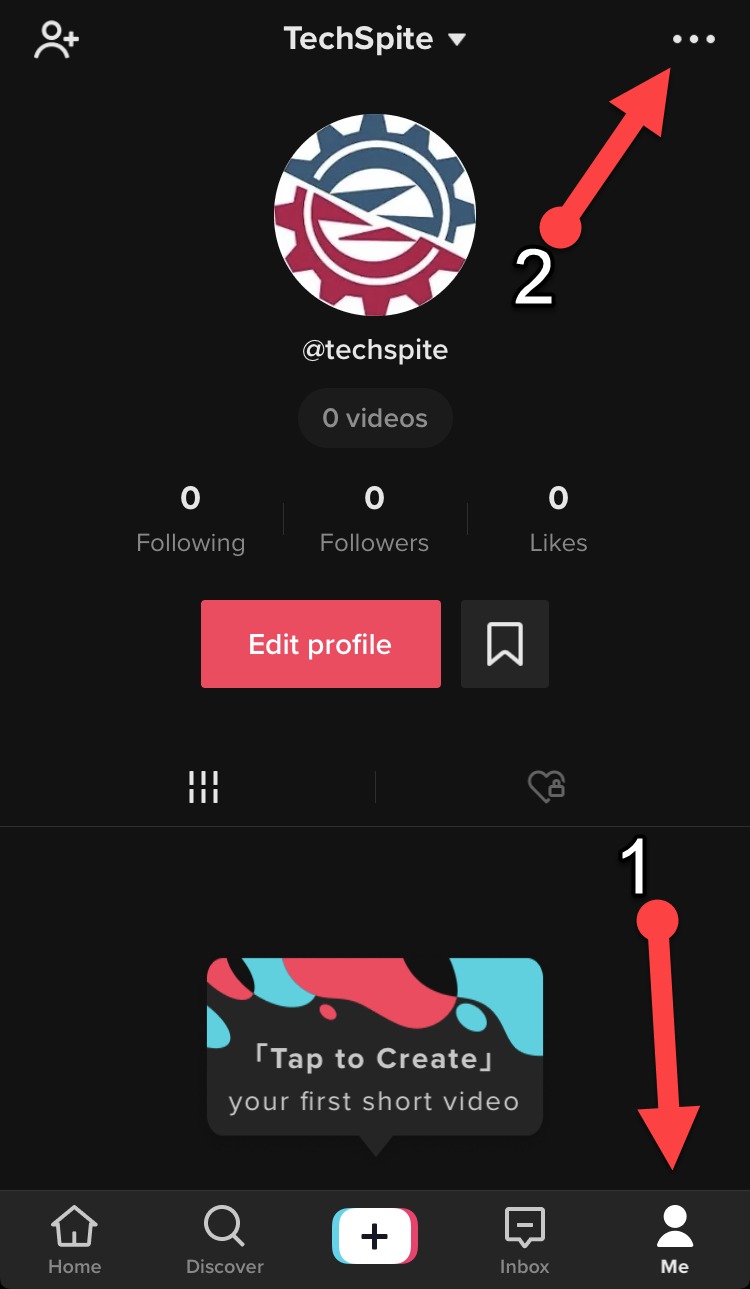 Three Dots
 Step 3. Then, you will have a new screen when you tap on that. So, you will see two options on the screen, you have to tap on the Restricted Mode option which is in 2nd.
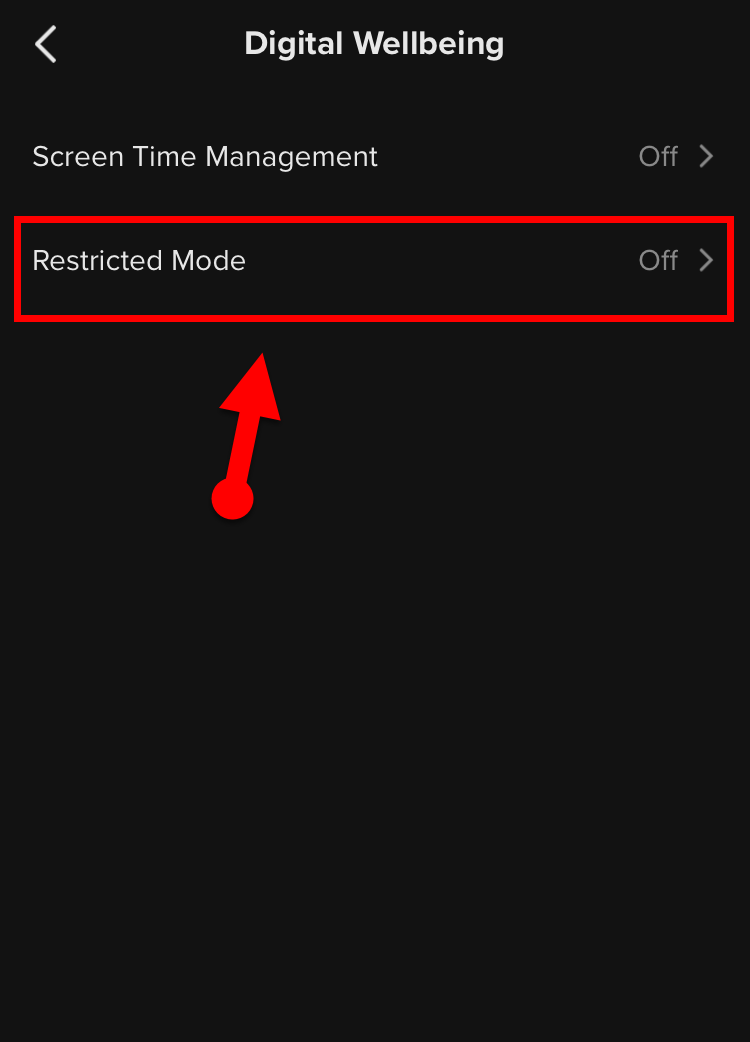 Restricted Mode
 Step 4. Afterward, the restricted mode screen will pop up. You have to tap on the Turn on Restricted Mode which is located at the bottom of the screen.
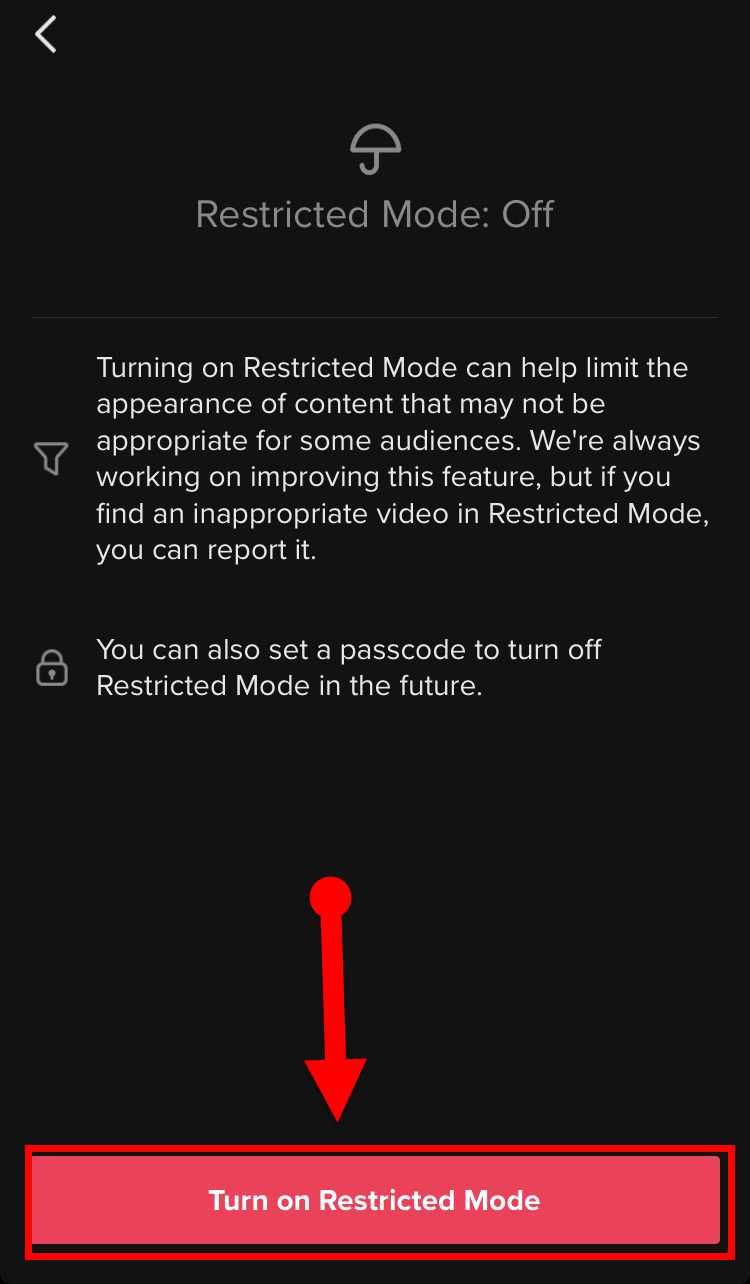 Turn ON Restricted Mode
 Step 5. For more safety, TikTok will ask to enter 4 digit password so that no one should turn off the restricted mode. If you don’t enter the password then you will not be able to turn on. Therefore, enter your desired password then make sure to click on the Arrow option.
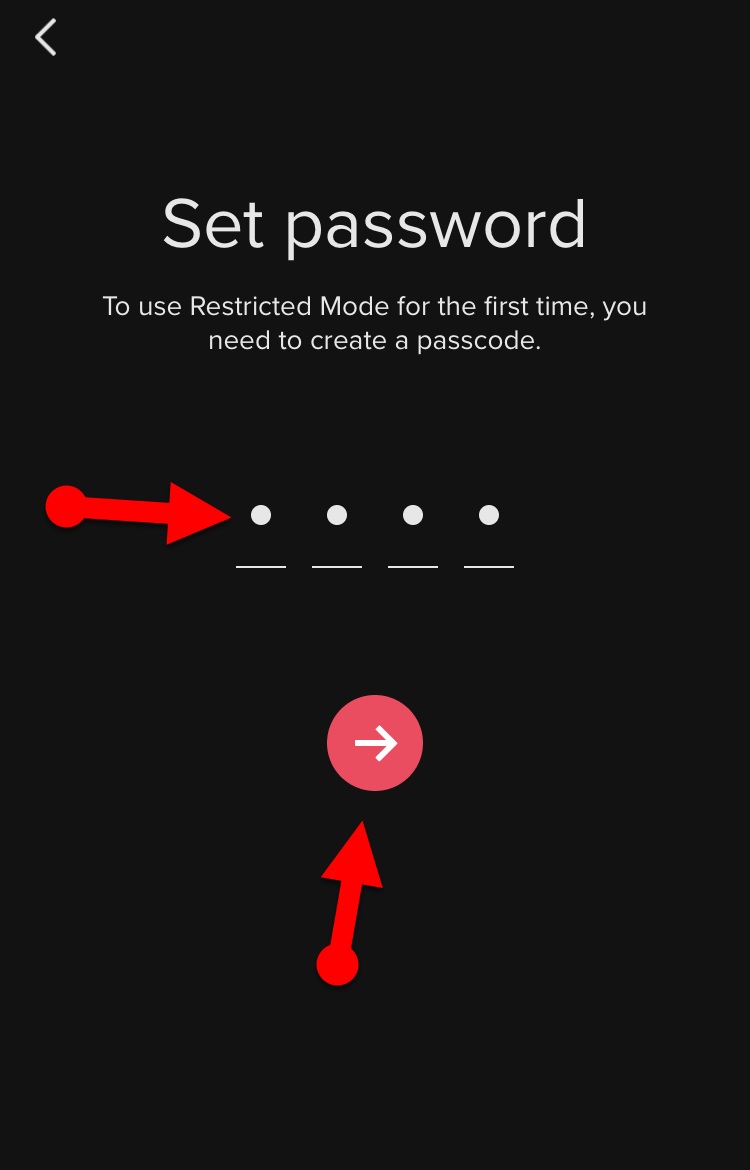 Set Password
 That’s it you have turned on Restricted Mode successfully.
Related Articles:
How to Turn Off Restricted Mode in TikTok on iPhone and Android
Turning Off the Restricted Mode is very simple and straightforward. It has the same steps as turning on has. So, follow the below steps.
Step 1. You have to launch your TikTok app on your iPhone or Android.
Step 2. You have to tap on the Me from the bottom on the right side. And you will enter to your profile, you have to tap on the Three Dots from the top right side.
Step 4. Then a new screen will appear, you have to tap on the Turn Off Restricted Mode.
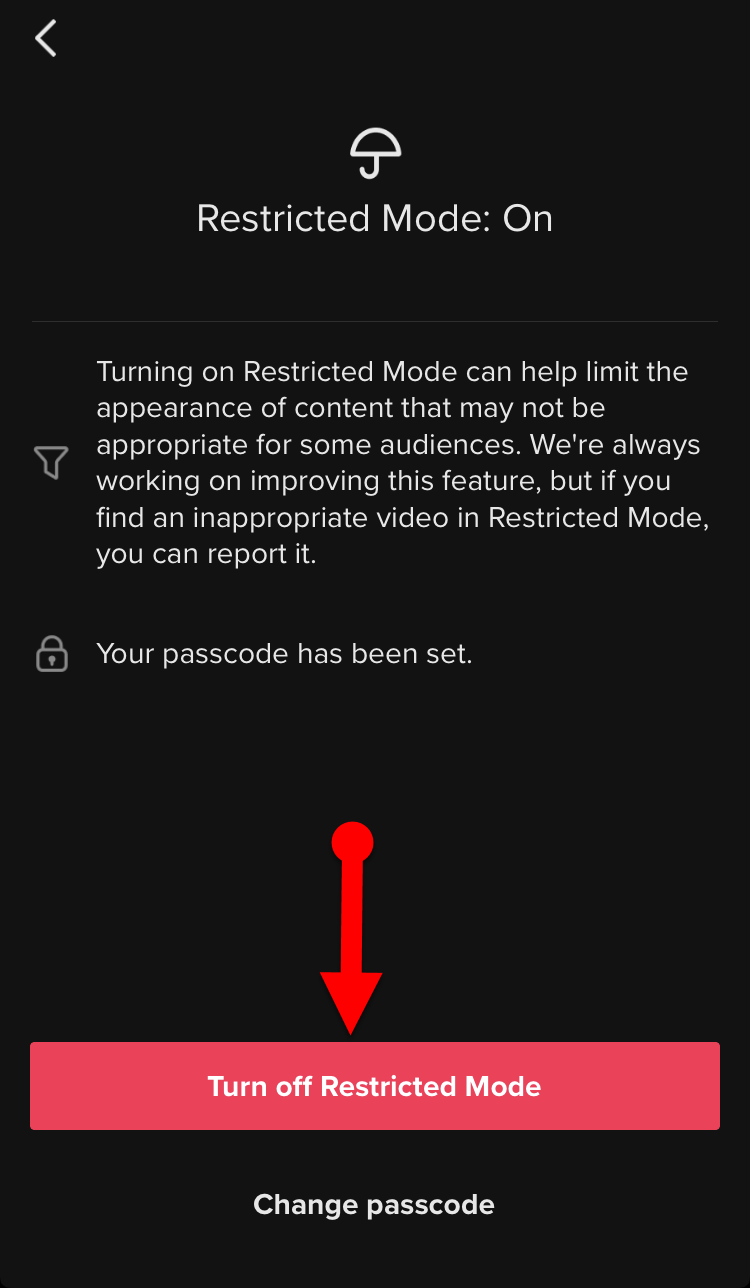 Turn Off Restricted Mode
 Step 5. Now, you need to enter the password which you had typed while turning on. Make sure to enter the password in order to turn off.
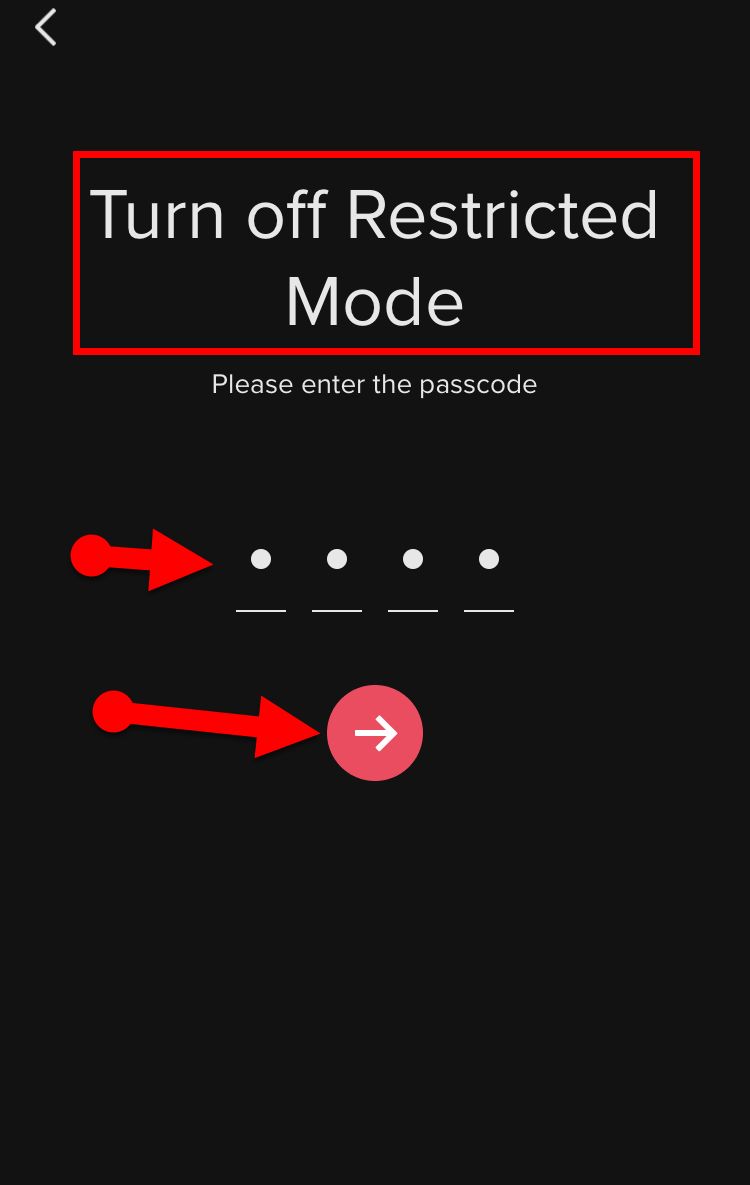 Enter the Password to Turn Off
 That’s all about How to Turn ON Restricted Mode in TikTok on iPhone and Android. We have to control safety for children at any angle while using something. So, the restricted mode is very useful and the best feature in the case of safety for under 18. So, it was all simple steps and I hope it was useful for you. Therefore, if you faced any kind of problem or any question then feel free to comment below. Don’t forget to comment on your feedback and suggestion.
Tagged
Share This Article
In this article, I am going to guide you on How to Turn ON Restricted Mode in TikTok on iPhone and Android. In today’s era, every individual person knows that TikTok became one of the best trending apps. People often use it just for entertainment. And people become the star of the world just by uploading 15 seconds of video on it. Moreover, nowadays even kids using TikTok for scrolling the video and making short clips just for fun. But now we have some problems with under 18 kids. As you know that as the number of users increased day by day, the quality and different types of content or video expand. So, unfortunately, many adult and violent clips are published by the passage of time. Therefore, turning on the restricted mode becomes more handy and easy work.
Noting is more important than taking care of kids from any angle of life. TikTok has some features for the kids, one of them is to enable the restricted mode, it means to avoid violent clips for the kids. In the case of safety for the kids and those who are not mature, the TikTok app introduced and designed Restricted Mode features for the users in order to limit and filter content that may not be suitable for minors and other audiences. Here is how you can easily enable Restricted Mode on the TikTok on iPhone and Android.
What is Restricted Mode?
Maximum Restricted Mode is available on every apps and device. It is one of the best and useful option, it will avoid the content that you may prefer not to see or don’t want others in your family to stumble across while enjoying especially TikTok or other apps for under 18.
How to Turn ON Restricted Mode in TikTok on iPhone and Android
So, the method which I am going to guide will work for both devices iPhone and Android. Just you have to be patient and follow each and every in order to Turn ON Restricted Mode Successfully and without and stuckness. Here’s how.
Step 1. In the very first step, you will need to open or launch TikTok App either you are using iPhone or Android.
Step 2. When it appears, you have to tap on the Me from the bottom on the right side. And you will enter to your profile, you have to tap on the Three Dots from the top right side.
Three Dots Step 3. Then, you will have a new screen when you tap on that. So, you will see two options on the screen, you have to tap on the Restricted Mode option which is in 2nd.
Restricted Mode Step 4. Afterward, the restricted mode screen will pop up. You have to tap on the Turn on Restricted Mode which is located at the bottom of the screen.
Turn ON Restricted Mode Step 5. For more safety, TikTok will ask to enter 4 digit password so that no one should turn off the restricted mode. If you don’t enter the password then you will not be able to turn on. Therefore, enter your desired password then make sure to click on the Arrow option.
Set Password That’s it you have turned on Restricted Mode successfully.
Related Articles:
How to Turn Off Restricted Mode in TikTok on iPhone and Android
Turning Off the Restricted Mode is very simple and straightforward. It has the same steps as turning on has. So, follow the below steps.
Step 1. You have to launch your TikTok app on your iPhone or Android.
Step 2. You have to tap on the Me from the bottom on the right side. And you will enter to your profile, you have to tap on the Three Dots from the top right side.
Step 4. Then a new screen will appear, you have to tap on the Turn Off Restricted Mode.
Turn Off Restricted Mode Step 5. Now, you need to enter the password which you had typed while turning on. Make sure to enter the password in order to turn off.
Enter the Password to Turn Off That’s all about How to Turn ON Restricted Mode in TikTok on iPhone and Android. We have to control safety for children at any angle while using something. So, the restricted mode is very useful and the best feature in the case of safety for under 18. So, it was all simple steps and I hope it was useful for you. Therefore, if you faced any kind of problem or any question then feel free to comment below. Don’t forget to comment on your feedback and suggestion.