
How to Create Bootable USB For Linux in Windows 11?
 Azaz Shaikh
Linux is just a kernel, the core component of the operating system that interacts with your hardware and various processes. What you see when looking at desktop-like those you see on the desktop it is called GNU/Linux, where GNU stands for GNU’s Not Unix. GNU is a free and open-source collection of software. There’s controversy on the whole Linux and GNU/Linux naming, and both have valid points, but for simplicity, we’ll just call the general OS Linux here. If you want to create a bootable USB for Linux then you need to read this article. So, without wasting any time let’s get has started. From this article, you will learn How to Create Bootable USB For Linux n Windows 11?
Related Post: Download macOS Monterey DMG File – (Direct Link)
Download Rufus
One of the easiest ways to create the bootable Linux the with the help of one software you can easily bootable. This software one of the great to make bootable of the operating system. However, this software doesn’t have any price to download software. To download the software then simply go to the official website of Rufus. To download the Rufus then follow the step down below.
Step 1. When you open the website then scroll down somehow after that click on the link to download the portable version.
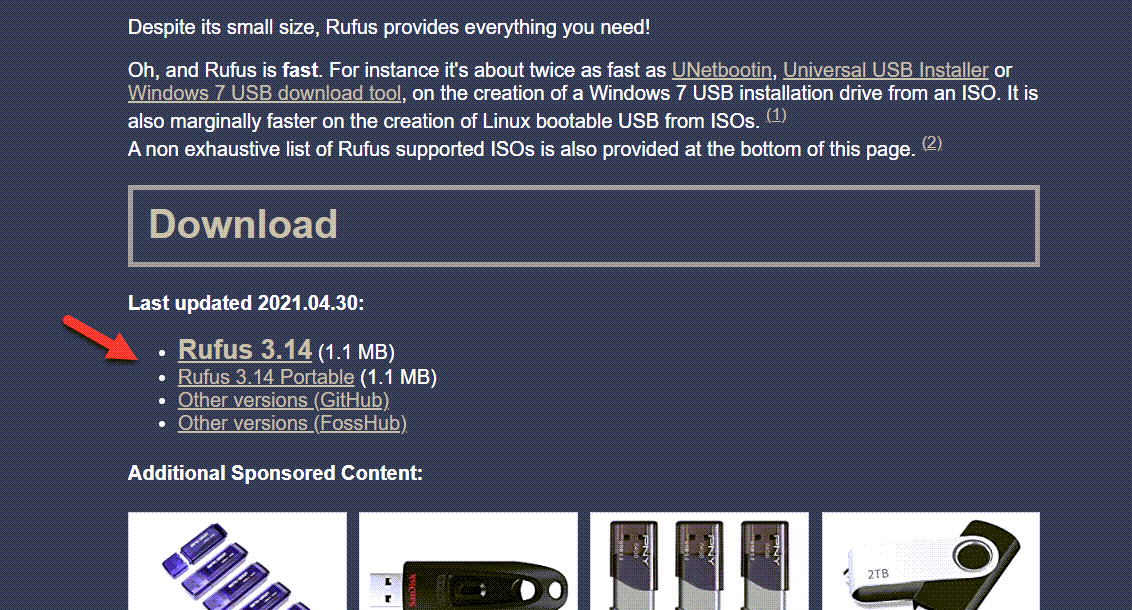
Step 2. Once the downloading is done then install it on your PC.
8GB USB Drive is Needed
If you want to bootable USB then you need to have an 8 GB USB flash. The operating system size is somehow large. It is a must that you have an 8 GB USB flash. If you don’t have an 8 GB USB drive after that it will create a problem during you are installing the OS.
How to Create Bootable USB For Linux in Windows 11
Now, we are in the last step. Moreover, if you want to create a bootable USB for Linux then you need to follow the step carefully. Follow the step down below.
Step 1. First of all, launch the Rufus on your PC after that click on the Select then chooses the ISO image. Now, when the select the ISO image then in the section of the Partition scheme you need to select the GPT after that at last tap on the Start.
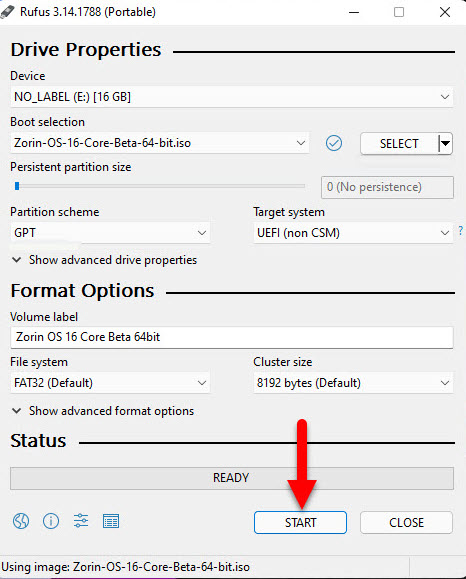
Step 2. Now, check the box of Write in ISO Image Mode then click on the Ok.
Step 3. Next, before you click on the ok then if you have something important inside your USB after that move all of them to your PC otherwise all of them will be deleted. And also he Rufus will give you a warning that moves them they will be destroyed.
Step 4. At last, wait till the file is not create. When the creating is done then it will copy to your USB flash.
Related Post: How to Make Windows 11 Taskbar Transparent
Bottom Line
It was all about How to Create Bootable USB For Linux in Windows 11? I hope this article is very helpful for you to create a bootable USB for Linux. From this article, you will get something good. This is the right place where you can easily solve your problem. After following these steps I hope you will not face any kind of problem. If you faced any kind of problem and if you have any type of suggestions then do comment.
Tagged
Share This Article
Linux is just a kernel, the core component of the operating system that interacts with your hardware and various processes. What you see when looking at desktop-like those you see on the desktop it is called GNU/Linux, where GNU stands for GNU’s Not Unix. GNU is a free and open-source collection of software. There’s controversy on the whole Linux and GNU/Linux naming, and both have valid points, but for simplicity, we’ll just call the general OS Linux here. If you want to create a bootable USB for Linux then you need to read this article. So, without wasting any time let’s get has started. From this article, you will learn How to Create Bootable USB For Linux n Windows 11?
Related Post: Download macOS Monterey DMG File – (Direct Link)
Download Rufus
One of the easiest ways to create the bootable Linux the with the help of one software you can easily bootable. This software one of the great to make bootable of the operating system. However, this software doesn’t have any price to download software. To download the software then simply go to the official website of Rufus. To download the Rufus then follow the step down below.
Step 1. When you open the website then scroll down somehow after that click on the link to download the portable version.
Step 2. Once the downloading is done then install it on your PC.
8GB USB Drive is Needed
If you want to bootable USB then you need to have an 8 GB USB flash. The operating system size is somehow large. It is a must that you have an 8 GB USB flash. If you don’t have an 8 GB USB drive after that it will create a problem during you are installing the OS.
How to Create Bootable USB For Linux in Windows 11
Now, we are in the last step. Moreover, if you want to create a bootable USB for Linux then you need to follow the step carefully. Follow the step down below.
Step 1. First of all, launch the Rufus on your PC after that click on the Select then chooses the ISO image. Now, when the select the ISO image then in the section of the Partition scheme you need to select the GPT after that at last tap on the Start.
Step 2. Now, check the box of Write in ISO Image Mode then click on the Ok.
Step 3. Next, before you click on the ok then if you have something important inside your USB after that move all of them to your PC otherwise all of them will be deleted. And also he Rufus will give you a warning that moves them they will be destroyed.
Step 4. At last, wait till the file is not create. When the creating is done then it will copy to your USB flash.
Related Post: How to Make Windows 11 Taskbar Transparent
Bottom Line
It was all about How to Create Bootable USB For Linux in Windows 11? I hope this article is very helpful for you to create a bootable USB for Linux. From this article, you will get something good. This is the right place where you can easily solve your problem. After following these steps I hope you will not face any kind of problem. If you faced any kind of problem and if you have any type of suggestions then do comment.